Dear Sovelia Plant users.
An issue with isometric generation in Plant 2026 was brought to our attention. In isometric drawings the numeric material code gets rounded in the BOM. So the material "1.4307" becomes "1.43" etc.
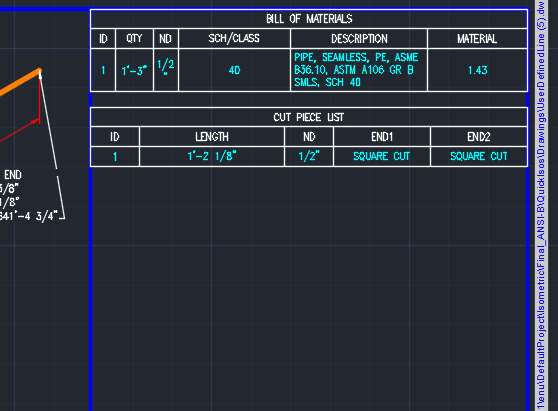
After troubleshooting we could confirm that the problem was not caused by Sovelia Plant, but was present in Plant 3D v.2026 out of the box.
There are two solutions to this issue. One is to use the workaround of adding space in the material code, for example "1. 4307", "1 .4307" or similar. Material codes with letters/spaces are not effected by this issue.
Another solution is to upgrade Plant 3D to the version 2026.2 as well as to install Autocad 2026.1.2. However, this requires some adaptations in your Sovelia Plant installation, to match it to the 2026.2 version of Plant 3D. Make sure to contact the Plant Solutions team at the following link before performing this upgrade, and we can help you with the required changes: https://sovelia.com/sovelia-products/sovelia-plant/#tab--contact-us